AI music is everywhere right now.
You type two sentences and get a finished song with vocals, a beat, and a chorus. It sounds fantastic, and for a quick experiment it is. But the whole thing raises one question that most demos quietly skip: are you even allowed to publish this music without landing in trouble?
This is exactly where it gets tricky.
Major music labels sued the best-known AI music providers for allegedly training their models on copyrighted material. Several of those cases ended in settlements in 2025. For you as a creator, that means with a lot of tools you can't be sure whether your ad or your podcast intro suddenly becomes a problem two years down the line.
ElevenLabs takes a different route here. With Music v2, launched in late May 2026, there's an AI music generator that, according to the company, was trained only on licensed data. At the launch of its music model, ElevenLabs put licensing deals with Merlin and Kobalt on the table, two rights bodies that cover artists like Adele, Nirvana, Beck, and Bon Iver. That makes Music v2 the only one of the major AI music tools that publicly commits to licensing its training data. In this guide I'll show you what Music v2 can do, why the licensing question matters so much, what the workflow looks like step by step, and who it's actually worth it for.
And I'm not just relaying what ElevenLabs claims. I tested Music v2 myself on my own Creator plan, with a real prompt and an actual track you can listen to. In a second test on an account with the Scale plan, I read the credit balance before and after every generation and had the song editor regenerate a single section. You can hear both versions of that track against each other further down.
- ElevenLabs Music v2 (live since late May 2026) is the only one of the major AI music tools that publicly commits to licensing its training data, backed by deals with Merlin and Kobalt
- I tested inpainting live and checked it across three measured regenerations from two separate instructions. It reliably changes only the section you mark, at 1,350 instead of 4,115 credits, but it does not deliver a real mid-track genre jump
- A 3-minute track in Auto mode costs around 5,400 credits on paper (900 credits per minute times 2 variations), and my own test measured 4,115 credits for two shorter variations, so keep that in mind when picking a plan
1. What is ElevenLabs Music v2?
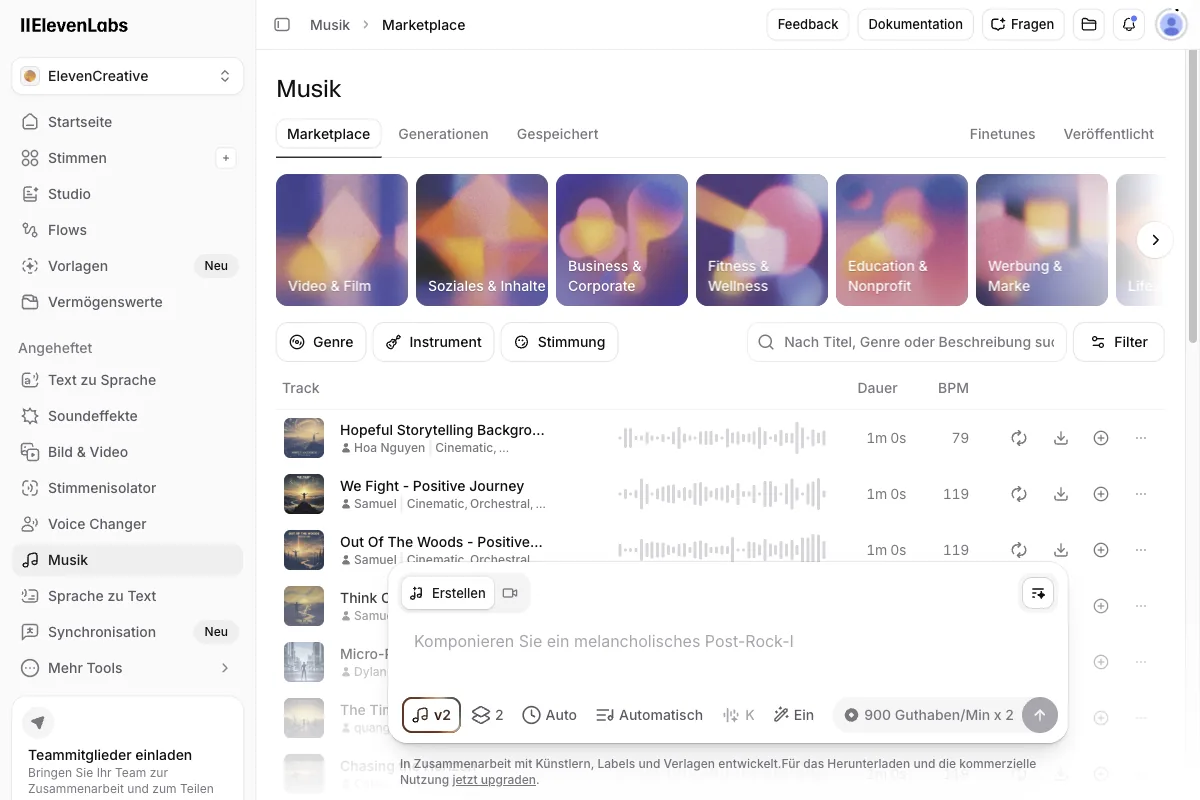
Most people know ElevenLabs as an AI voice provider. Text-to-speech, voice cloning, transcription, all at a high level, as I cover in detail in my ElevenLabs review. Music v2 is the musical side of that platform, and since the launch in late May 2026 it has grown up considerably.
At its core, Music v2 works like the voice features: you describe in words what you want, and you get a finished track. You don't need to read notes, operate a digital audio workstation, or play a single instrument. You type, for example, that you need calm lo-fi beats for a podcast background, and Music v2 generates exactly that.
Two features set version 2 apart from simple one-click generators.
1.1 Mid-track genre switching
Mid-track genre switching lets you change the style within a single piece. Picture an ad that starts calm and then builds toward the call to action. You begin with a relaxed ambient passage and have the track shift into a driving, energetic style in the second half. You no longer have to splice two songs together; Music v2 handles the transition inside the same track. That's how the product page sells it, at least. How far it carries in practice is something I measured in section 4.4.
1.2 Inpainting
You might know inpainting from AI image editing, where you regenerate a single section of an image. In Music v2, it works the same way, just with audio.
Here's what that means:
If you like a finished track 90% of the way but one specific spot misses, say a bridge or a transition, you mark exactly that passage and have it regenerated. The rest stays untouched. That saves a huge amount of time, because you don't have to generate a brand-new song just because eight seconds in the middle don't sit right.
2. The deciding factor: license-clean music
Now we get to what really makes Music v2 special. The sound quality is good, but the thing that really sets it apart is the legal footing.
ElevenLabs built its music generator on licensed material from the start, instead of simply vacuuming up half the internet. At launch it had deals with Merlin and Kobalt in place, and according to Kobalt the artists themselves decide via opt-in whether their music goes into the training set.
The result:
The music is commercial-cleared, according to ElevenLabs. You get a commercial license on every paid plan and can publish the tracks.
2.1 Why this matters for you
Sounds like legal fine print, right? Do you really need it?
Yes, if you publish content, you do. Here are a few concrete scenarios:
- YouTube. With Content ID, YouTube has one of the sharpest music-detection systems out there. Upload music with unclear rights and you risk claims, demonetized videos, or, in the worst case, strikes. License-clean music takes that worry off the table.
- Advertising. Paid advertising often has real money on the line, and brands are especially careful here. A campaign halted over music rights is an expensive mistake. With commercial-cleared music, you're on the safe side.
- Podcasts. You hear your intro in every single episode. If the music there has shaky licensing, you're building a problem that grows with every episode and, in the worst case, can only be fixed by re-scoring everything.
- Apps and games. Here music gets baked into a product you sell or distribute. Later legal disputes can't simply be solved by swapping out a file.
In short:
Anywhere your content is public and, in case of doubt, makes money, the clean legal footing isn't a nice extra. It's insurance against nasty surprises.
3. Music v2 compared to Suno and Udio

When you talk about AI music, you can't get around Suno and Udio. Both are technically impressive and can do more than just background music, namely complete songs with vocals and lyrics. So I'm not here to bash them; they have their place. But on the legal footing there's an important difference you should know about.
Suno (currently version 5.5) and Udio were at the center of lawsuits from major music labels.
The accusation:
The models were trained on copyrighted material. Several of those cases ended in settlements in 2025. Warner Music settled with Udio and then, days later, with Suno in November 2025, signing on as a licensing partner in the Suno deal, while Sony Music was still litigating at that point. That doesn't automatically mean every track from these tools is a problem. But it does mean the question of clean commercial use isn't fully settled there.
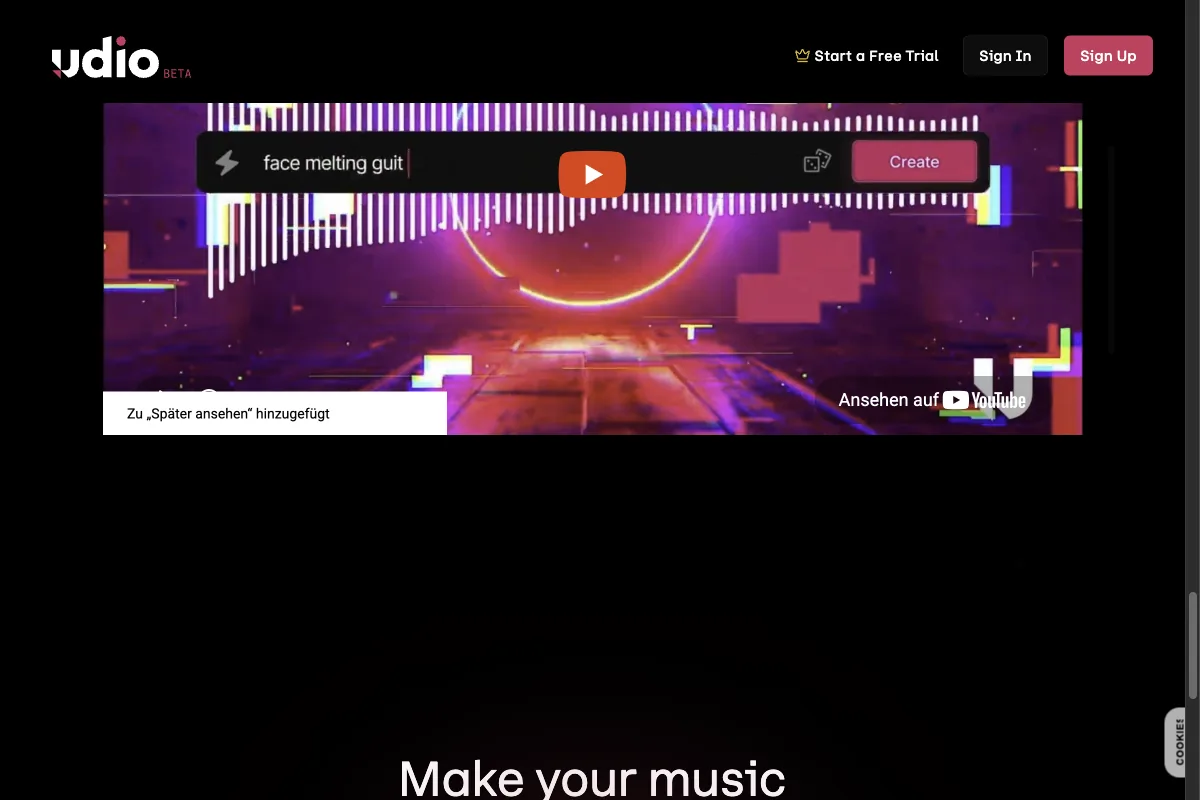
ElevenLabs sidestepped this dispute by using only licensed material from the outset. Here's the direct comparison.
One limitation you should know about this table:
It compares the legal footing and the feature set, not the sound. I didn't set up a Suno account for this test, so there is deliberately no Suno listening sample here to hold my track against. Everything you hear in this article comes out of Music v2. If you're looking for a sonic head-to-head, this article won't give you one.
My take:
If you want finished songs with vocals for a creative project and the legal question is secondary for you, Suno and Udio are currently more powerful. But the moment your music runs commercially and you don't want to risk the training-data question catching up with you later, Music v2 is the safer choice. For the typical use cases of an online business owner, namely background music, intros, and ad sound, that's usually the more important point.
4. ElevenLabs Music v2: my test, step by step
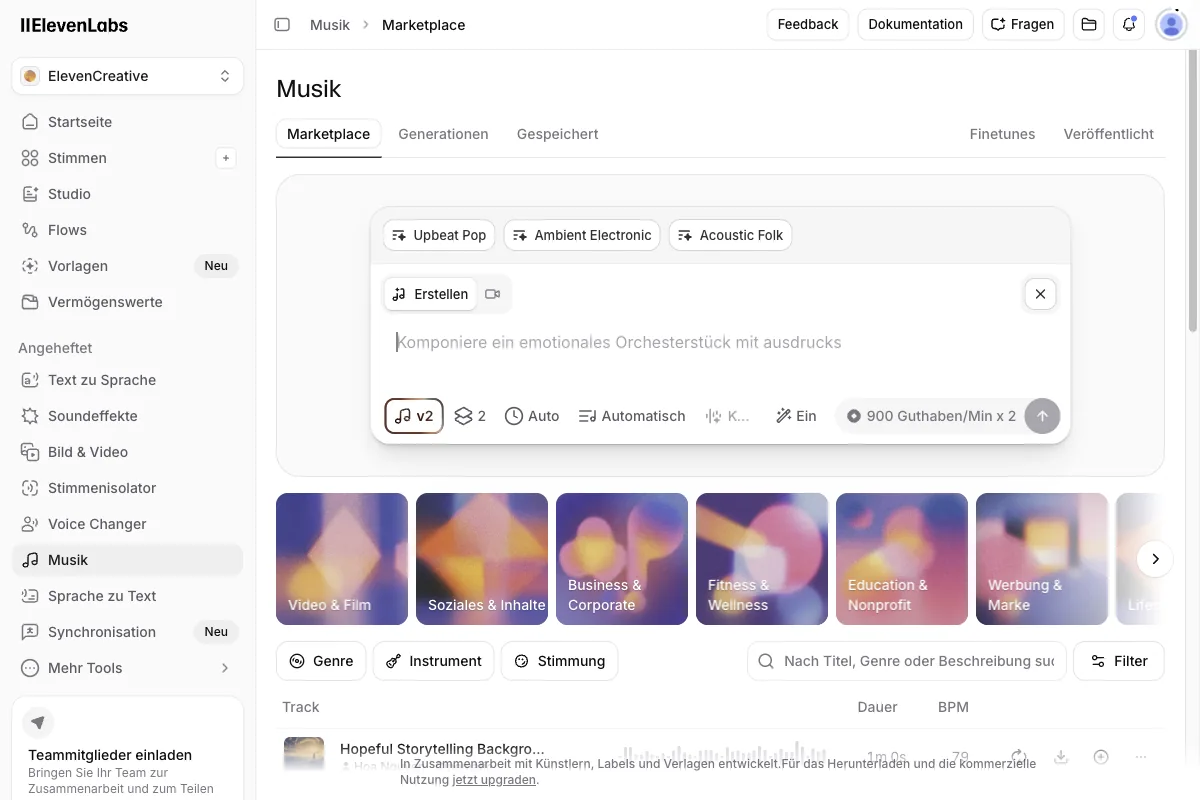
Enough theory; let's look at how you actually create a track. The process is refreshingly simple, precisely because you control everything through text. And I'm not showing you someone else's example, I'm showing you my own test.
4.1 Write the prompt
It all starts with the description. You type in words what you want to hear. The more specific, the better. Instead of just "relaxed music," go with "calm lo-fi beats with soft piano and subtle vinyl crackle, ideal as a background for a podcast."
For this article, I did exactly that and entered the following prompt into my Creator account:
"Relaxed lo-fi hip-hop with warm vinyl crackle and soft piano, calm background music for an explainer video."
Since the prompt is the only control surface in Music v2, here are all the prompts I actually submitted for this article, word for word, along with the genre tags Music v2 produced from them so you can see what the wording actually does. I ran my account in German, so these went in as German text and are reproduced with a translation. That in itself is useful to know: Music v2 takes instructions in German just fine. There are only three of them, because those are the three I ran, and I didn't want to pad the list with invented examples.
Prompt 1 (Creator account, full track)
Relaxed lo-fi hip-hop with warm vinyl crackle and soft piano, calm background
music for an explainer video.
[German original: "Entspannter Lo-Fi Hip-Hop mit warmem Vinyl-Knistern und
sanftem Piano, ruhige Hintergrundmusik für ein Erklärvideo."]
What it produced: tags hip-hop, electronic, ambient. Title "Entspannter Lo-Fi Glück".

Prompt 2 (Scale account, full track)
Relaxed lo-fi hip-hop beat with soft piano, warm bass, and subtle vinyl crackle.
Calm background music for a podcast intro. Instrumental, no vocals.
[German original: "Entspannter Lo-Fi-Hip-Hop-Beat mit weichem Klavier, warmem Bass
und dezentem Vinyl-Knistern. Ruhige Hintergrundmusik für ein Podcast-Intro.
Instrumental, kein Gesang."]
What it produced: tags lo-fi, hip-hop, instrumental. Titles "Morgenkaffee" (2:00)
and "Stille Gassen" (2:30).

Prompt 3 (instruction for a single section in the song editor)
Turn the outro into an energetic synthwave finale with a driving beat and bright
synthesizers
[German original: "Verwandle das Outro in ein energetisches Synthwave-Finale mit
treibendem Beat und hellen Synthesizern"]
What it produced: 140 BPM, energetic synthwave finale, driving four-on-the-floor
beat, punchy gated reverb snare, bright shimmering synth arpeggios, powerful
analog synth lead melody, pulsing bassline, 80s retro futuristic aesthetic,
wide stereo image.
Music v2 automatically detected the genres hip-hop, electronic, and ambient from my prompt and named the finished track "Entspannter Lo-Fi Glück" on its own. Here's what my generation list looked like afterward:
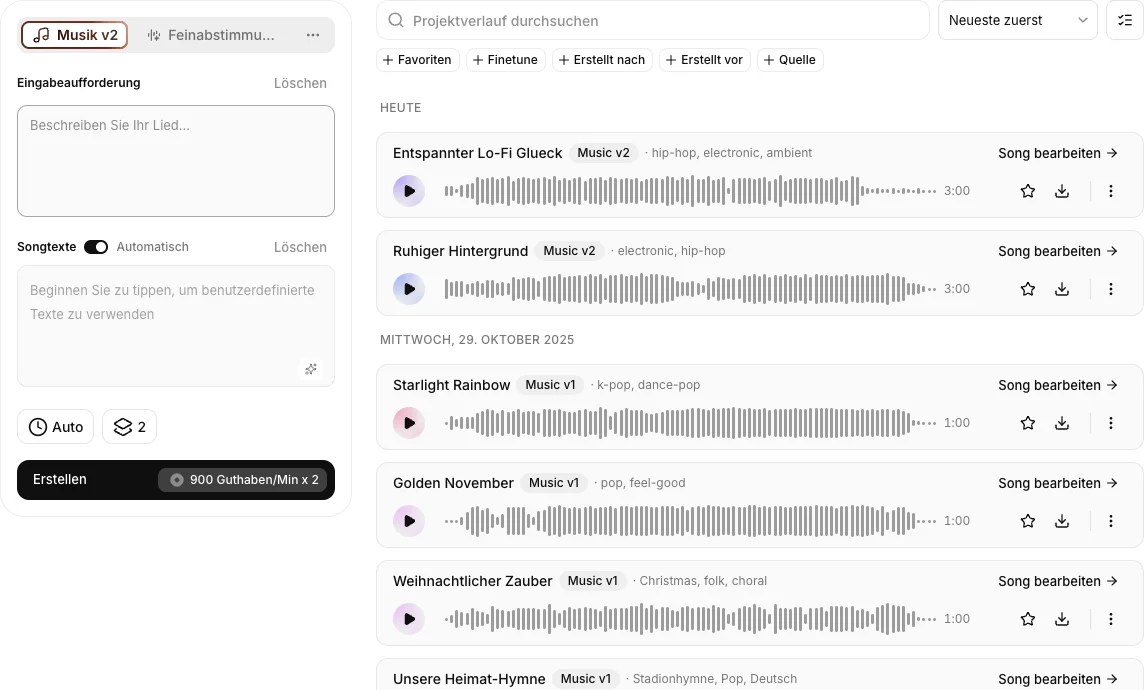
On the left you see the full create panel, with the prompt field, the lyrics toggle (set to "Automatic" for me), the "Auto" length setting, the variation count (2 by default), and, right above the create button, the cost: 900 credits per minute times 2 variations. In the list on the right you can also see older Music v1 tracks still sitting in my account from earlier tests, the jump to v2 is obvious from the genre tags alone.
Here's the clip from my actual result, a 30-second excerpt from the full 3-minute track:
Music v2 track from my prompt: "Relaxed lo-fi hip-hop with warm vinyl crackle and soft piano, calm background music for an explainer video" (30-second excerpt)
4.2 Set the genre and mood
Music v2 covers a wide range, from lo-fi, ambient, and cinematic to pop, rock, and electronic, all the way to orchestral pieces. You pick the genre directly in the prompt, and Music v2 detects it automatically, as you can see above from my three tags: hip-hop, electronic, and ambient. If you're unsure, go ahead and generate two or three variations with slightly different descriptions and compare them.
4.3 Choose the length
Decide how long the track should be. A podcast intro often needs only 15 to 30 seconds, while for a YouTube background you'll want several minutes. Keep in mind that "Auto" picks the length of both variations for you, usually somewhere between two and three minutes, and that this shows up directly in your credit balance. For a cheap test, set the length manually to 15 to 30 seconds instead of Auto.
I didn't want to estimate how much that actually costs, so I measured it. On an ElevenLabs account on the Scale plan, which costs $299 a month for 1.8 million credits, I entered the same style of prompt again, this time asking for a calm lo-fi hip-hop beat with soft piano, warm bass, and subtle vinyl crackle as a podcast intro, instrumental and without vocals. With the length set to "Auto," Music v2 again produced two variations, this time with its own titles "Morgenkaffee" (2:00 minutes) and "Stille Gassen" (2:30 minutes), plus the automatically assigned tags lo-fi, hip-hop, and instrumental.
I read the credit balance immediately before and after: 1,840,607 credits before the generation, 1,836,492 after. That's 4,115 credits for both variations together, measured rather than estimated.
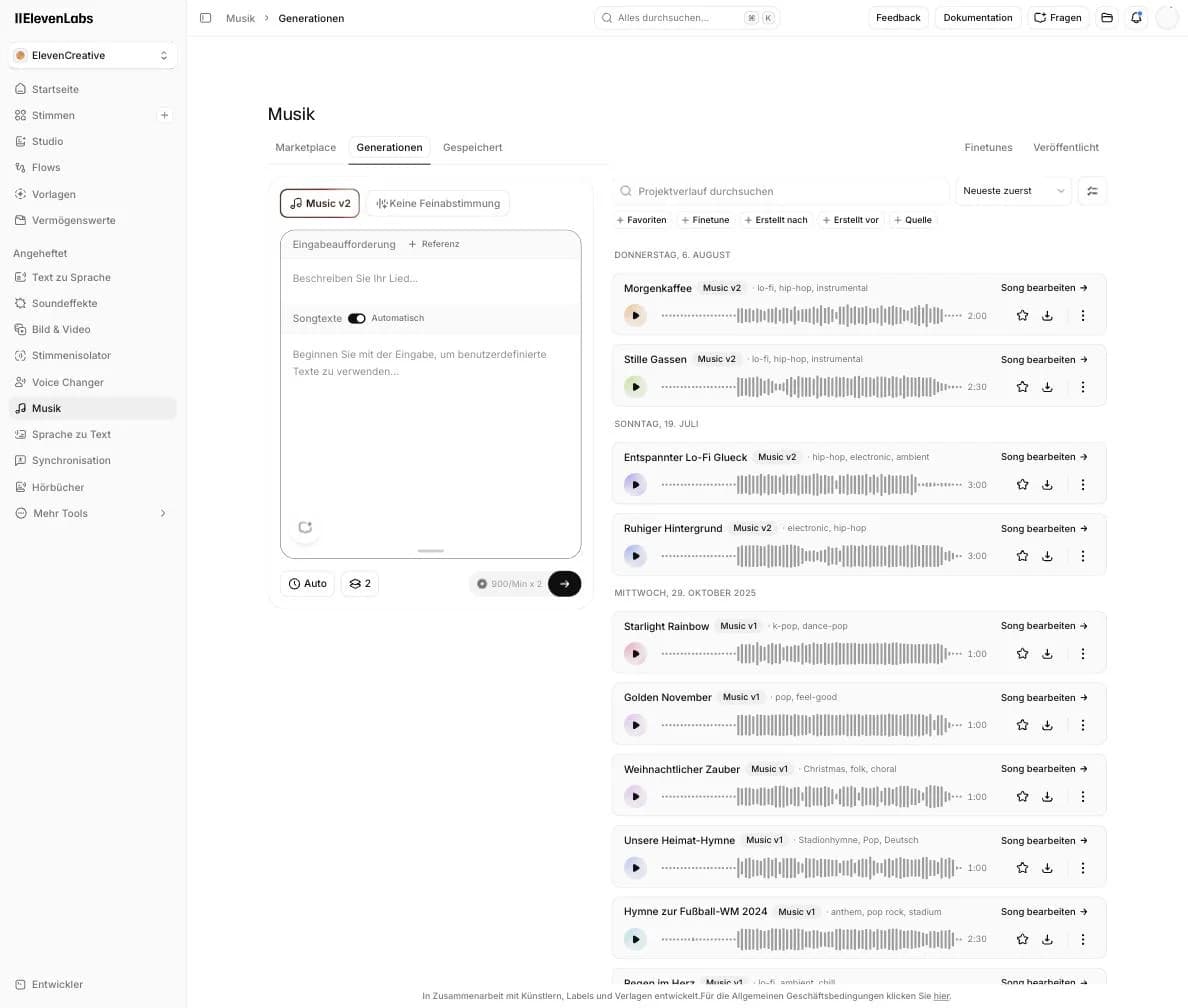
That lines up almost exactly with the advertised rate of 900 credits per minute per variation: 2:00 plus 2:30 minutes makes 4.5 minutes, times 900 credits works out to 4,050 credits on paper. The small overhang to the measured 4,115 credits is most likely the actual render length running past the round minute marks. For you that means the 900-credit formula isn't a rough ballpark, it holds in practice to within a couple of percent.
Here's "Morgenkaffee," the 2:00-minute variation from that second test:
Music v2 track "Morgenkaffee" from my second test on the Scale account, prompted for a calm lo-fi hip-hop beat with soft piano, warm bass, and subtle vinyl crackle as a podcast intro (30-second excerpt)
4.4 Use inpainting and genre switching
Now comes the part that sets Music v2 apart from simple one-click generators, and the part I inspected in full inside the song editor. Click "Edit song" on a finished track and you land in exactly this view:
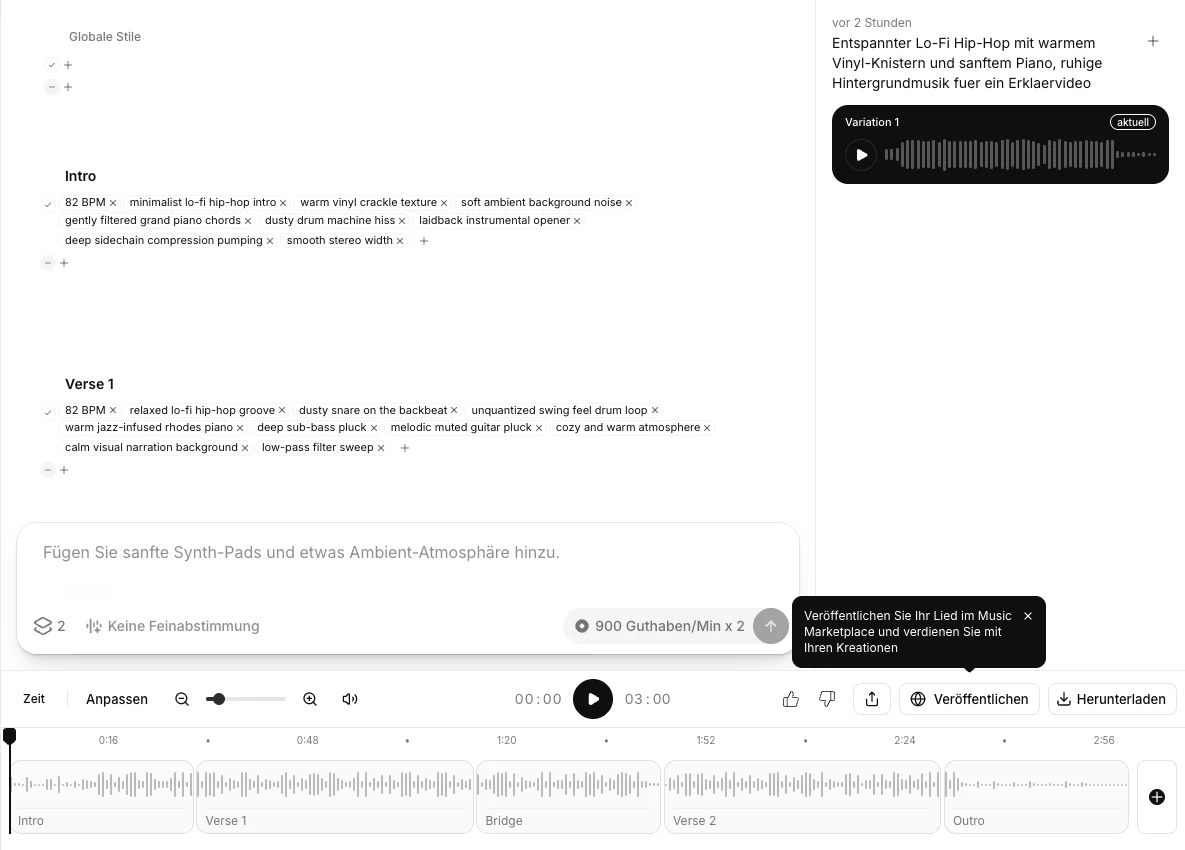
What you see here is my older track from the Creator account, which runs at 82 BPM. The Morgenkaffee track from the Scale test, the one coming up in a moment, has its own section layout and runs at 68 BPM, so don't mix the two up.
That Creator track is split into five sections, Intro, Verse 1, Bridge, Verse 2, and Outro, which you can see individually in the timeline at the bottom. Each section has its own style tags. My intro carries tags like "82 BPM," "minimalist lo-fi hip-hop intro," and "warm vinyl crackle texture," while Verse 1 has "relaxed lo-fi hip-hop groove," "dusty snare on the backbeat," and "warm jazz-infused rhodes piano." There are also "Global styles" that apply to the whole track.
That makes the mechanics behind both features concrete:
- Inpainting means you mark a single section, say the bridge, and have only that regenerated, either with its existing tags or with a short text instruction in the field below it (mine showed the placeholder "Add soft synth pads and some ambient atmosphere"). The rest of the track stays exactly as it is.
- Genre switching means you swap a section's style tags for different ones, say "laidback" for "energetic," or a dusty drum-machine hiss for a punchier beat, and have only that section regenerated. The transitions to the neighboring sections stay intact.
Both cost the same rate as the full track, 900 credits per minute times 2 variations.
So much for the theory. This is exactly the spot where my first test had nothing but a description, and a headline feature you can only describe isn't a feature. So I went back and did it.
The genre switch, run live
For that I opened the song editor for the Morgenkaffee track, so the 68 BPM piece from the Scale account, not the Creator track from further up. I marked the outro section and typed a single sentence into the instruction field:
"Turn the outro into an energetic synthwave finale with a driving beat and bright synthesizers"
That's it. No tags swapped by hand, no sliders touched.
Music v2 then rewrote the tags of that one section only. The outro's 68 BPM and lo-fi attributes turned into "140 BPM," "energetic synthwave finale," "driving four-on-the-floor beat," "punchy gated reverb snare," "bright shimmering synth arpeggios," "powerful analog synth lead melody," "pulsing bassline," "80s retro futuristic aesthetic," and "wide stereo image." Intro, Groove A, and Groove B stayed untouched at 68 BPM lo-fi:
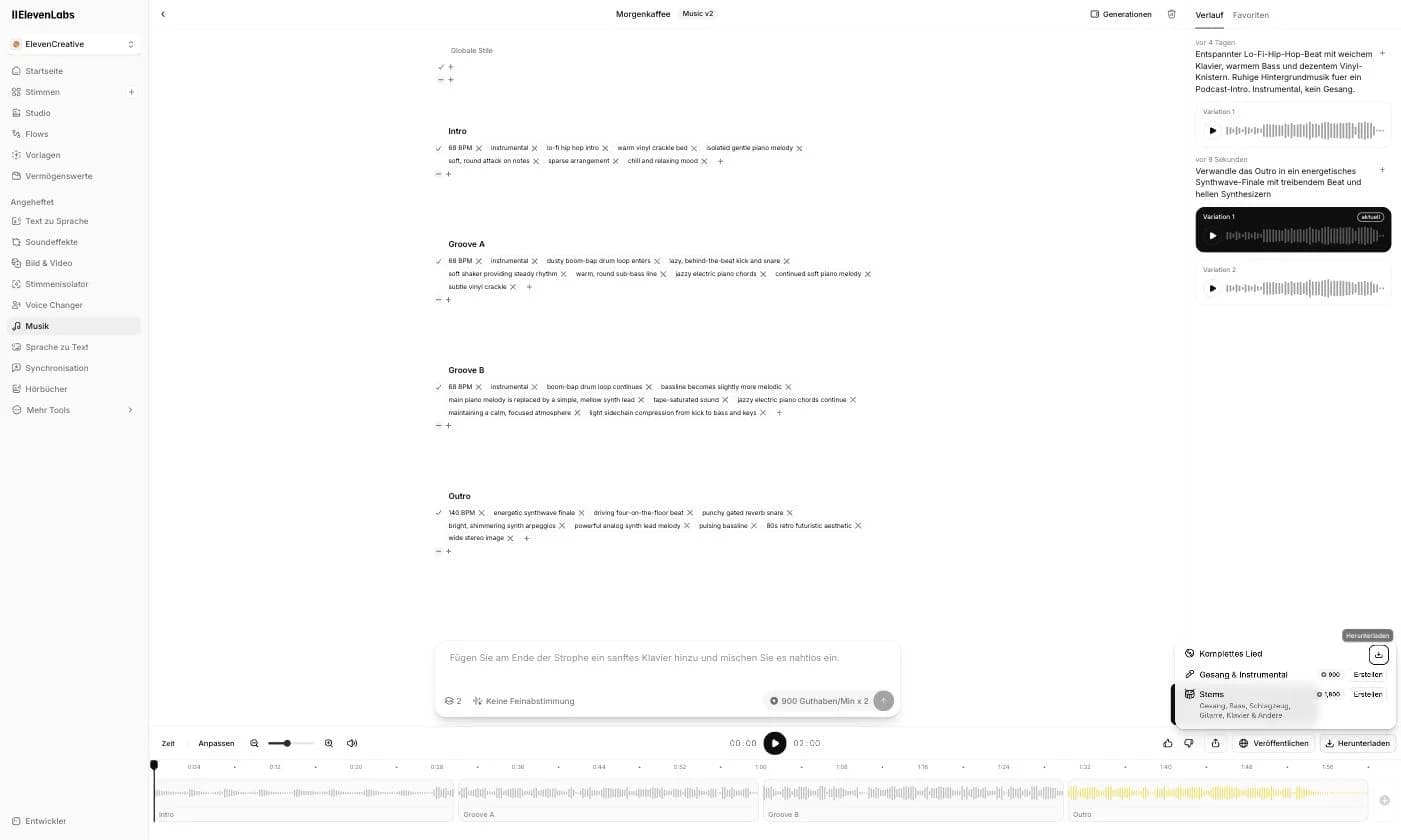
The contrast sits right there in the editor, three sections at 68 BPM above and the outro at 140 BPM below. In the timeline at the bottom, only the outro block is highlighted in yellow, so only that part was regenerated. On the right in the history you can see my instruction and the two variations Music v2 made from it.
And the section promise does hold up. I lined both versions of the track up against each other afterward, and the first 85 seconds match in the old and the new file. The only thing that changed is the ending. That's precisely the difference between inpainting and rolling the dice again.
Here are both versions across the same window, the last 30 seconds of the track:
Outro before the regeneration, last 30 seconds of "Morgenkaffee" (lo-fi tags, 68 BPM)
The same window after the regeneration, so with the new synthwave tags on the outro
And yes:
The tags promise more here than actually comes out of the speakers. So I measured both excerpts, and tempo, attack density, and timbre sit close together in both versions. The new outro is a different outro, but it isn't an audible break from lo-fi to synthwave.
I wasn't willing to leave it there. So I pushed further and ended up measuring three regenerations of the same section, coming from two separate instructions.
The second version was the other variation of the same instruction that Music v2 supplies anyway. It got its own tags at 120 BPM and behaved exactly the same way sonically.
For the second instruction, I then made it as blunt as it gets.
"Hard techno finale, 150 BPM, distorted kick drum on every quarter note, abrupt style change with no transition, no lo-fi whatsoever"
On the tag level, Music v2 nailed it. The section is now called "Techno Finale," the new tags match, and the tool even stripped out the old lo-fi markers on its own, meaning vinyl crackle, boom-bap drums, and piano. This version also diverges from the original earlier than the first two did.
The sound still doesn't do what the tags say. A distorted kick on every quarter note should show up as a clear, continuous pulse, and that's exactly what's missing. In the window that no longer contains any of the original, the reading comes to 0.085, while the original lo-fi groove holds its 68 BPM at 0.244. The timbre barely moves (971 versus 1,008 Hz) and the attack density only rises slightly, from 110 to 124 per minute.
What I take away from that:
Section regeneration follows your instruction reliably at the tag level and leaves the neighboring sections alone. Sonically, though, it stays much closer to the source material than the new tags promise. Coherence beats radicality, and for background music that's often exactly what you want. A real mid-track genre jump is something I could not produce across three measured regenerations from two separate instructions.
That leaves the question of what this cost.
Here too I read the credit balance immediately before and after: 1,835,263 credits before the regeneration, 1,833,913 after. That's 1,350 credits for the two new outro variations.
 gradually.ai
On paper that should have been 900 credits, since two takes of roughly 30 seconds add up to a minute of music times 900. As with the full track, the overhang comes down to the actual render length including the transition.
The direction is unambiguous all the same. Regenerating a single section costs about a third of a full Auto track, and you keep everything that already works.
There's one thing you shouldn't forget, though.
Every additional instruction costs credits again. My attempts on that one outro added up accordingly, though the only one I measured exactly was the first.
4.5 Export and use it
Once you're happy, you download the finished track. You can choose MP3, MP4, WAV, or an extended format, then drop it into your project, into your video editor, your podcast software, or your app. Thanks to the commercial license on the paid plans, you can publish the track afterward without worry.
5. Use cases: where Music v2 is worth it
Music v2 is not a replacement for a human composer writing a custom piece for your film. ElevenLabs doesn't claim it is. But for the everyday music needs of creators, it's exactly the right tool.
So you don't have to guess which settings a use case needs and what it costs you, here are the four most common ones in a table:
Credits calculated at 900 credits per minute and variation. In my measurement, actual usage came in about 1.6% above that formula.
The prompt building blocks all follow the same trio of mood, genre, and purpose I showed you above. And the last column tells you immediately why the length setting is the most expensive decision in the whole tool. Between an ad spot and a YouTube background sits a factor of twelve.
If you want to see how Music v2 fits into the broader landscape, check out my roundup of the best AI music generators. And if you want to use ElevenLabs for voices too, you'll find all the details in my overview of the best AI voice generators.
6. Pricing and credits
Music v2 has no separate price; it runs on the regular ElevenLabs plans and the shared credit system. That's convenient because you pay for voice, transcription, dubbing, and music out of one pot.
Here's how the plan logic works (as of my live test in the account):
- Free ($0/month): Access to Music v2 to try it out. Commercial use is heavily restricted here, in some cases removed entirely.
- Starter ($6/month): 30,000 credits, the cheap entry with a full commercial license for voice and music.
- Creator ($22/month, my own plan): 121,000 credits, with additional pay-as-you-go credits available. New customers sometimes get a first-month discount (for example $11), check the current offer on the pricing page.
- Pro ($99/month): 600,000 credits.
- Scale ($299/month): 1.8 million credits.
Because Music v2 charges a flat 900 credits per minute times 2 variations, you can roughly work out how many tracks each plan gets you if you spent the entire budget on music alone. A 3-minute Auto track costs around 5,400 credits.
In practice, you're sharing those credits with voice, dubbing, and transcription, so these numbers are more of a ceiling. Paying annually also saves you two months, you effectively pay for 10 months instead of 12. EU buyers pay the USD price plus 19% VAT on top, so $22 net becomes roughly $26 gross. For a more detailed breakdown of the plans, see my article on ElevenLabs pricing.
7. Where Music v2 hits its limits
Up to this point, almost everything in this article has worked. That's not because Music v2 has no weaknesses, it's because the interesting spots only surface once you work with it for longer than five minutes.
Here's what I ran into during the test:
- Auto length decides your costs, not you. With the length set to "Auto," Music v2 picks for you, and in my test that produced 2:00 and 2:30 minutes. I never asked for that, but I paid for it all the same, to the tune of 4,115 credits for a single generation.
- The tool assigns titles and genre tags. My tracks came out as "Morgenkaffee," "Stille Gassen," and "Entspannter Lo-Fi Glück" without me asking, and Music v2 set the tags lo-fi, hip-hop, and instrumental on its own. For a tidy file structure, that means renaming every track afterward.
- Everything I got was instrumental. I explicitly asked for that in the second run but not in the first, and the lyrics toggle was set to "Automatic." So I can't vouch for vocals in Music v2 from firsthand experience.
- You can't set the section boundaries yourself. Music v2 splits the track into intro, grooves, and outro, and you work with that split. Dropping your own marker at second 47 and regenerating from exactly there isn't on offer.
- A real mid-track genre jump isn't happening. Section regeneration follows your instruction reliably at the tag level and leaves neighboring sections untouched, but sonically it stays much closer to the source material than the tags promise. Even an instruction specifying 150 BPM, a distorted kick, and explicitly no transition failed to produce a techno finale. I checked that across three measured regenerations from two separate instructions, with the numbers in section 4.4. For background music this coherence is often welcome, but as a genre-switch feature it's oversold.
- Stems cost extra. The complete song downloads for free. Splitting vocals and instrumental costs 900 credits, and for the individual stems (vocals, bass, drums, guitar, piano, and other) ElevenLabs charges 1,800 credits. That's exactly what a full minute of new music with two variations costs.
None of this is a dealbreaker. But these are the points no product tour will show you, and the ones you should know before you plan out your monthly credit budget.
- The only one of the major AI music tools that publicly commits to licensing its training data
- A commercial license on every paid plan
- Targeted regeneration of individual sections, 1,350 instead of 4,115 credits in my test
- Wide genre range according to the vendor, from lo-fi to orchestra
- Part of the ElevenLabs platform, no second subscription needed
- Free plan to try it out
8. My verdict
AI music is impressive, but most tools sell you the quick result and stay silent on the question that matters most in commercial use.
Am I even allowed to publish this?
That's exactly where ElevenLabs Music v2 comes in. It's not the tool with the most spectacular vocal tracks; Suno and Udio currently do that better. But it's the tool you use to produce music for YouTube, podcasts, ads, and apps without worrying about copyright.
My own test confirms that. My prompt delivered a usable track in one pass, and inpainting holds up technically. It really does regenerate only the section you mark, everything before it stays untouched, and the 1,350 credits for it are barely a third of what a full track costs.
On the sound, I'm more reserved. My lo-fi outro never became a synthwave finale despite the tags, and an explicitly requested 150 BPM techno finale stayed close to the rest of the track across three measured regenerations. The tool would rather hold its song together than tear it apart on command, and that's exactly the kind of detail you only pick up by doing it yourself instead of reading the product page.
That said:
The credit cost caught me off guard. 4,115 credits for a single Auto track with two variations is more than I expected, and if you regularly generate long tracks, it's worth doing the math on whether Creator is enough or you need Pro or Scale from the start.
And yes:
That's exactly why it pays to regenerate individual sections in the editor rather than whole tracks. Combined with the clean licensing and the fact that everything lives inside the ElevenLabs platform, it's still a very convincing package for online business owners.
My advice:
Try it, but set the length manually to 15 to 30 seconds for your first attempts instead of Auto. That gives you a feel for the quality and the workflow without blowing through your credits.
And if you're not sure whether ElevenLabs as a whole, not just for music, is the right tool for you, take a look at my comparison of the best ElevenLabs alternatives first.
If you want to dive straight in, you can get to ElevenLabs here and start with the free plan.